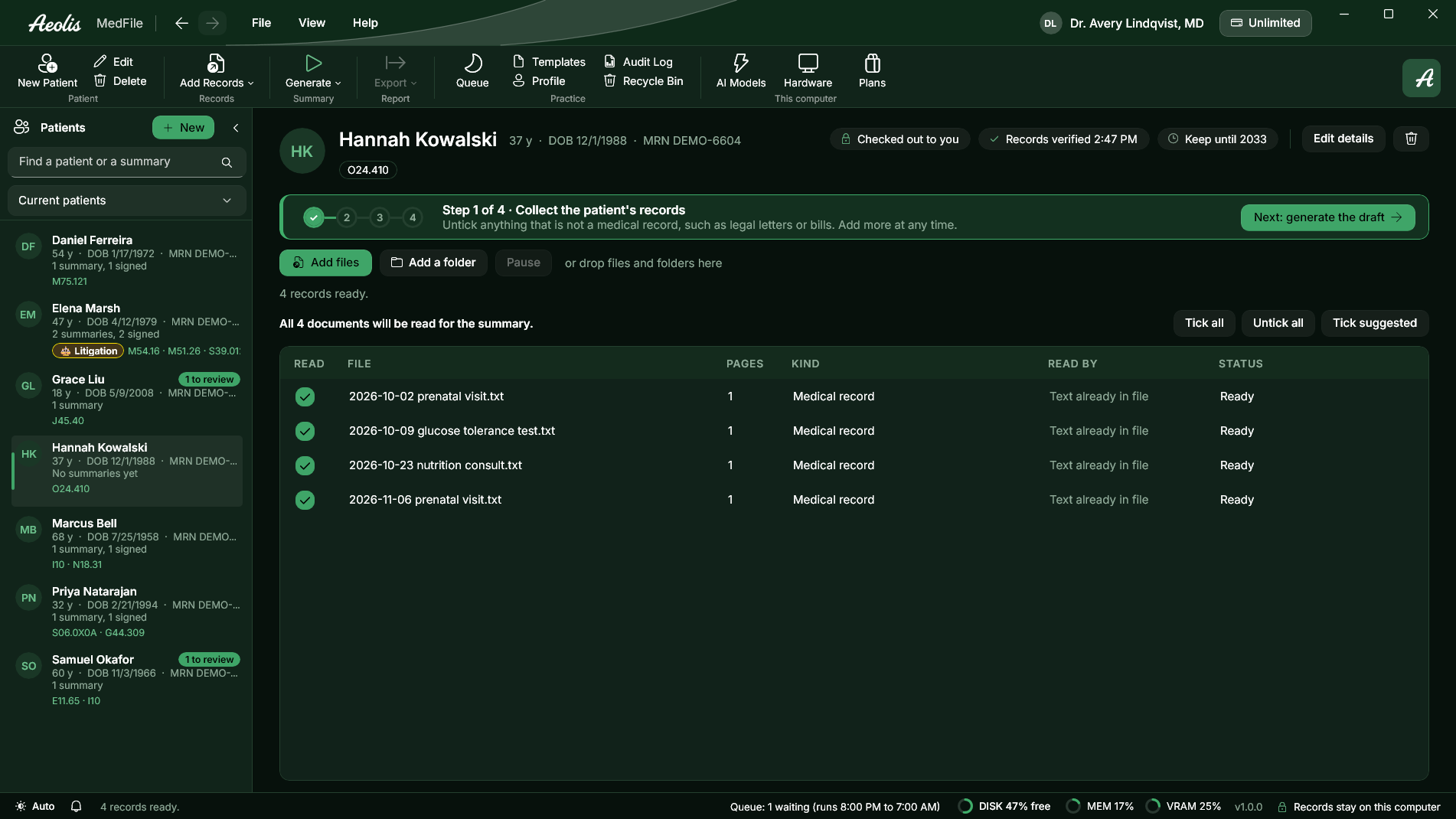
Add files or a folder and choose what belongs in the summary.
Generate and review a draft
Review and edit the result against the source records before signing.
Sign and export
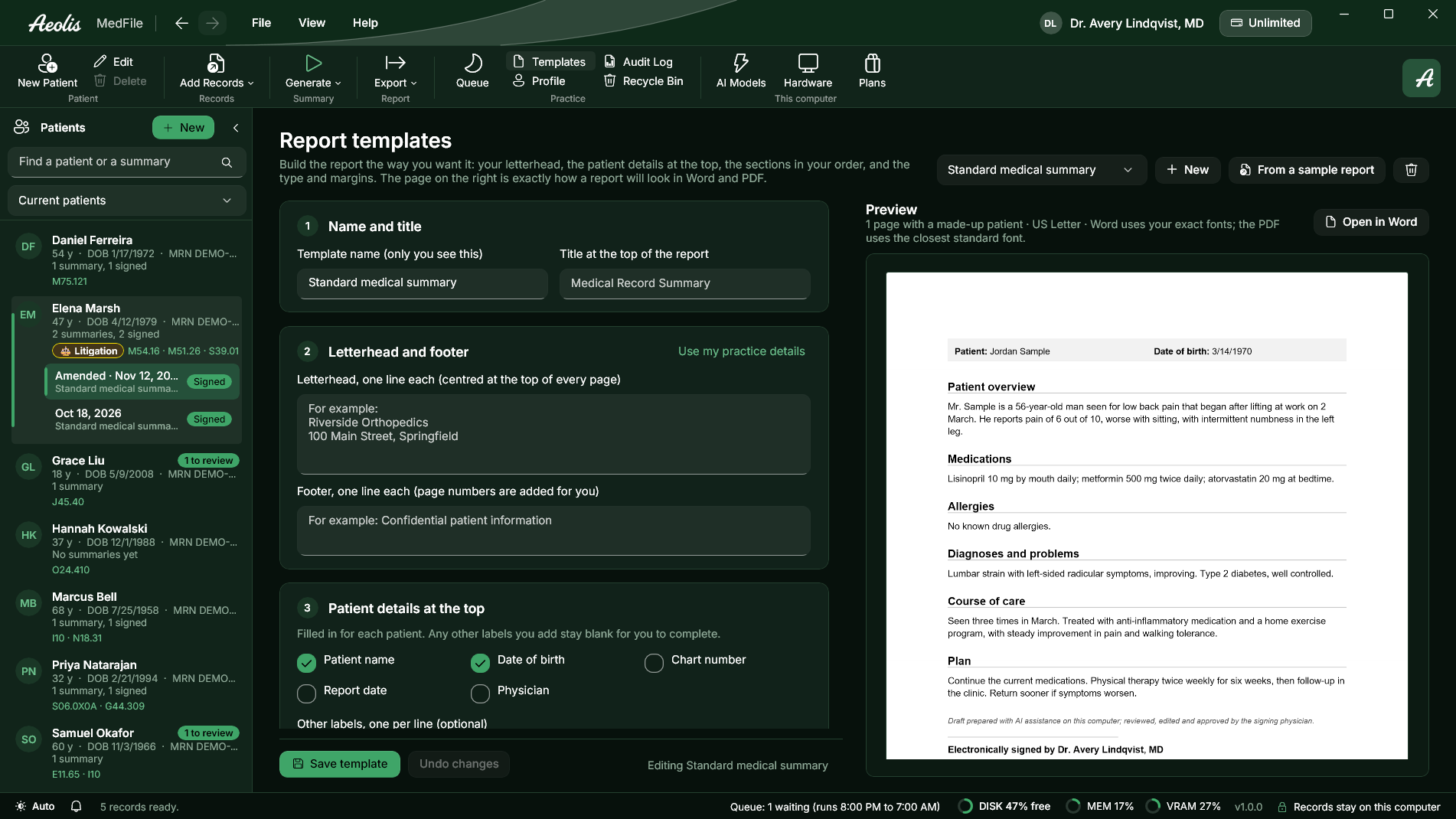
Use report templates to format the document for Word or PDF.
HIPAA and regulatory compliance are the sole responsibility of the user. A licensed physician must review AI drafts and remains responsible for the final, signed summary. MedFile is a working tool for use alongside the practice’s primary medical record.
Aeolis MedFile
Inside MedFile
Choose records to include. This screenshot uses demo data.Preview a report template before using it in your workflow.
MedFile in your practice
See the physician review workflow, compare MedFile with cloud scribes and EHRs, and estimate costs per doctor.
AI runs on the practice’s Windows PC. MedFile stores patient records, extracted text, drafts, and signed summaries locally and uses an encrypted patient database.
Application files are kept separately from practice files. Crash reports and support logs stay local and are scrubbed of identifying details such as names, chart numbers, dates, phone numbers, email addresses, and file paths.
Check out a patient record to avoid simultaneous edits. MedFile shows who has it and logs a takeover.
Four guided steps
Collect records, generate the draft, review and edit against the sources, then sign and export. Use Back and Next or jump straight to any step.
Start drafting now or queue the work for later. Signing always requires physician review.
Record import and integrity checks
Import files or folders containing PDF, DOCX, plain text, CSV, PNG, JPEG, TIFF, or BMP. Windows OCR reads scanned pages and images in the background.
MedFile fingerprints imported files with SHA-256 and flags changed, missing, or unreadable records. Exclude files that should stay out of the draft.
Structured AI drafts
Draft an overview, medications, allergies, diagnoses, course of care, and plan using the practice’s report template.
Check statements marked UNVERIFIED SOURCE against the records. MedFile processes long histories in sections and keeps completed work when you pause.
Choose models based on the PC’s hardware. MedFile can use a compatible GPU or fall back to the CPU and warns when smaller models may omit details.
Overnight queue
Queue patients for hours set by the practice. The queue can keep the computer awake, runs at low priority, and can resume in the next scheduled window.
Sort by patient, status, or time queued. Review problems and retry individual jobs.
Review, signing, and amendments
Edit beside a page-by-page report preview with template, status, page, and zoom controls.
After reviewing the records, the physician can draw or upload a signature. The report includes the physician’s credentials and the signing date and time.
Drafts are watermarked and can be discarded. Signed summaries are locked and fingerprinted. Later changes create linked amendments and preserve the signed original.
Reports and templates
Export signed reports as PDF or Word. Customize sample templates or create your own sections, section order, and drafting instructions.
Add practice letterhead, patient details, a physician signature block, and page numbers.
Litigation holds, audit history, and retention
Flag a patient for litigation hold to prevent deletion. Export a ZIP with original records, signed summaries, the patient’s audit trail, and a chain-of-custody sheet with fingerprints.
Review and export a hash-linked audit history for significant actions such as edits, signatures, exports, check-outs, and terms acceptance.
Set retention periods, including a separate rule for patients seen as minors. Review records past retention based on first and last use.
Patient library
Organize current and past patients with ICD-10 tags. Review possible duplicates by chart number or by name and date of birth.
Search patient names, chart numbers, and summary text. Filter for drafts, signed summaries, litigation holds, or records past retention.
Restore eligible deleted patients from the Recycle Bin within 30 days.
Setup and bulk imports
The setup wizard covers the practice and physician profile, AI model download, report template, overnight hours, and patient list import.
Import a patient list from CSV or Excel. Bulk import patient folders matched by name or chart number.
Windows workspace and accessibility
Use the ribbon, collapsible patient sidebar, Day and Night themes, and a shortcut chart. Signing requires a deliberate action through the interface.
Use screen reader labels and Windows high-contrast settings. Check notifications, disk space, memory, graphics memory, and queue progress.
Storage, hardware, and diagnostics
Review disk usage and patient records by size. Check AI performance, hardware options, and overheating protection.
Review scrubbed crash reports locally. Support can review them with the practice during a remote session.
Availability
Get started
Download MedFile for Windows. Your first summary is free. Buy additional summaries, plans, and support through Microsoft Store checkout in the app. Confirm current prices at checkout.
 NEITSCH
 Aeolis MedFile